Bambu Lab set a standard with the X1 Carbon: enclosed, fast, reliable-out-of-the-box printers, with built-in multicolor and a polished software experience. In 2026 the range has grown — and turned over. Several flagship models have been replaced, and the large-format H series has multiplied. This guide sorts it out: what's on sale today, what each machine is worth, and which one fits your use.
Two notable retirements: the X1 Carbon was officially pulled from the main consumer lineup (April 2026) in favor of the X2D, and the P1S is now joined by the P2S. In large format, the H2D (dual extrusion + laser) paved the way for the H2S (single-nozzle, the most recent) and the H2C (low-waste multi-material). And the A series gains a new large-format open machine, the A2L (June 2026).
The Bambu Lab lineup in 2026
The machines fall into four series, from most accessible to most professional:
- A series (A1 mini, A1) — open Cartesian "bed slingers," simple and affordable. Great for PLA/PETG and getting started in color with the AMS Lite.
- P series (P1S, P2S) — fast enclosed CoreXY, the "workshop" core that handles technical materials.
- X series (X2D) — the "premium" tier: dual nozzle, sensors, heated chamber. The X1 Carbon is its direct ancestor.
- H series (H2D, H2S, H2C) — large format and production: big volumes, dual extrusion or swappable hotends, and even laser/cutting on the H2D.
The common thread is the AMS ecosystem (Automatic Material System), which adds multicolor and filament drying, and in-house software (Bambu Studio + Bambu Handy) known for being smooth. It's also what makes Bambu philosophically close to Creality's CFS — see our Creality printer guide for the comparison.
Like most makers, each model comes standalone and as a Combo (with an AMS). If multicolor interests you, the Combo is almost always better value than buying an AMS separately.
Comparison table
An overview of the current models. Prices are indicative (printer only, before promotions) and vary by region and time.
| Model | Volume (mm) | Type | Chamber | Nozzle max | Price ≈ |
|---|---|---|---|---|---|
| A1 mini | 180 × 180 × 180 | Cartesian (open) | No | 300 °C | ≈ $219 |
| A1 | 256 × 256 × 256 | Cartesian (open) | No | 300 °C | ≈ $299 |
| A2L | 330 × 320 × 325 | Cartesian (open) | No | 300 °C | ≈ $469 |
| P1S | 256 × 256 × 256 | CoreXY (enclosed) | Passive | 300 °C | ≈ $399 |
| P2S | 256 × 256 × 256 | CoreXY (enclosed) | Passive | 300 °C | ≈ $549 |
| X2D | 256 × 256 × 260 | CoreXY · dual nozzle | Heated ≤ 65 °C | 300 °C | ≈ $649 |
| H2S | 340 × 320 × 340 | CoreXY · single nozzle | Heated ≤ 65 °C | 350 °C | ≈ $1,249 |
| H2D | 350 × 320 × 325 | CoreXY · dual nozzle | Heated ≤ 65 °C | 350 °C | ≈ $1,899 |
| H2C | 350 × 320 × 325 | CoreXY · multi-hotend | Heated ≤ 65 °C | 350 °C | ≈ $2,399 |
Reading between the lines: the real hierarchy isn't speed (they're all fast) but the envelope — heated chamber, size, and multi-material strategy. The A and P series cover 90% of needs; the X and H series target technical parts, large format and production.
A series — A1 mini, A1 & A2L
The A series are Cartesian moving-bed ("bed slinger") printers, open frame, built for simplicity. Fully automatic calibration, vibration compensation, textured PEI plate, all-metal hotend to 300 °C: set up and print. They target PLA, PETG and TPU; without a chamber, ABS/ASA isn't their turf. Three models — A1 mini, A1 and A2L (there is no separate "A2") — from most compact to very large format.
A1 mini
The entry point (≈ $219 alone, ≈ $329 Combo). Compact 180 × 180 × 180 mm volume, tiny footprint, quiet. With the AMS Lite, it does four-spool multicolor for an unbeatable price. Ideal for getting started, for kids, or for a small desk. → our detailed A1 mini review.
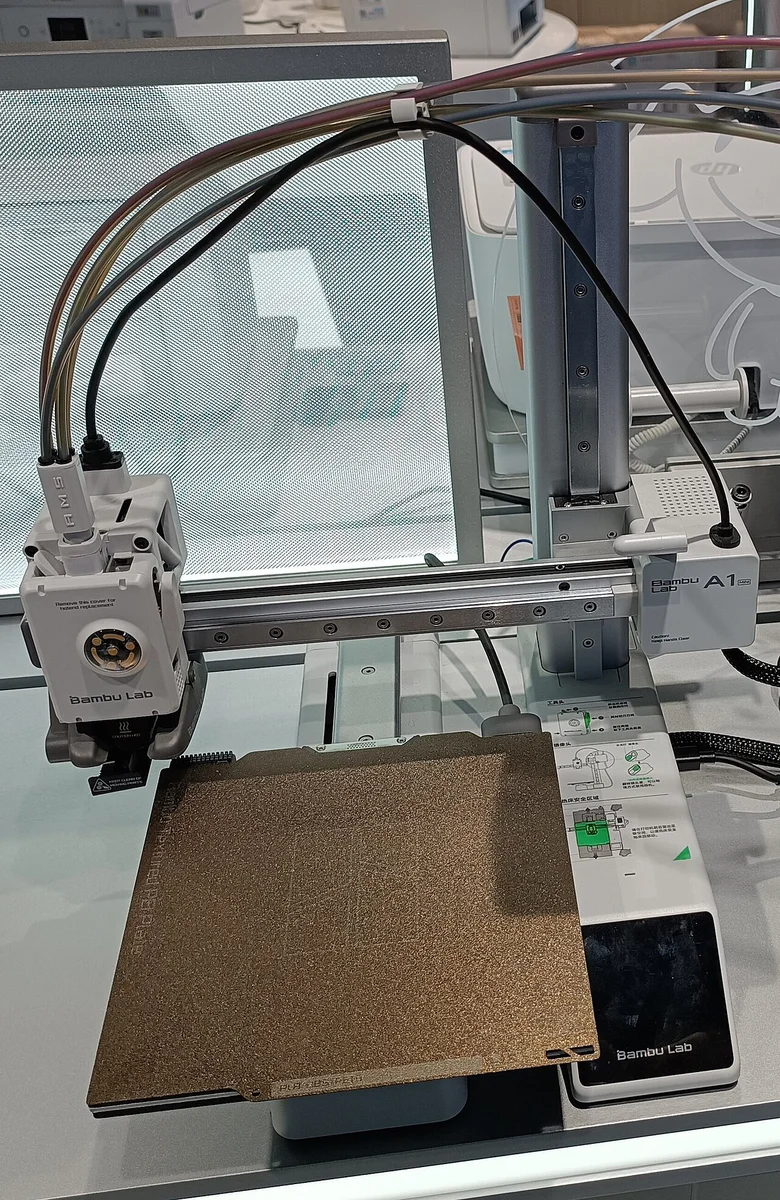
A1
The big sibling (≈ $299 alone, ≈ $399 Combo) steps up to 256 × 256 × 256 mm and adds a color touchscreen. Same philosophy, more volume: it's the best value for getting serious in PLA/PETG, multicolor included. → our detailed A1 review.
A2L — the "extra large" format
The June 2026 newcomer (≈ $469 alone, ≈ $569 Combo). It's not an A1 replacement but a new category: an open-frame bed slinger with a very large 330 × 320 × 325 mm volume (about 105% more than a 256 mm machine). Open frame and a bed capped at 80 °C: it's built to print big in PLA, PETG and other non-engineering materials. It debuts adaptive vibration compensation (correction during the print, not just a one-time calibration) and accepts a cutting and plotting module — a blade for stickers, leather, fabric and paper, and a pen to draw. No laser module (no enclosure). For color, up to 19 shades by combining multiple AMS units (enclosed boxes + AMS Lite). → our detailed A2L review.
Beginners, families, casual makers. If you don't print ABS/ASA and extreme speed isn't a goal, an A1 does everything you'd expect, very well, for very little.
P series — P1S & P2S
The P series is the enclosed CoreXY: faster, more rigid, and crucially able to trap heat for ABS, ASA, PC and composites. No lidar or advanced AI like the X series — you pay for the mechanics and the enclosure, not the sensors.
P1S
The longtime best-seller (≈ $399 alone, ≈ $549 Combo). Enclosed CoreXY, 256 × 256 × 256 mm, ~500 mm/s, 300 °C hotend, full AMS support. Minimal display, no advanced camera inspection, but reliability and price/performance that made it the mid-range benchmark. → our detailed P1S review.
P2S
The successor (≈ $549 alone, ≈ $799 Combo with AMS 2). A modernized P1S: touchscreen, AI monitoring, better support for fiber-reinforced filaments. It's now the single-material workhorse to recommend if the budget goes above the P1S. → our detailed P2S review.
The regular maker who wants a versatile enclosed machine without blowing the budget. The P1S is still an excellent buy; the P2S edges it on comfort (screen, AI) for a bit more.
X series — X1C & X2D
The X series was long Bambu's "consumer" flagship. In 2026 it pivots from an all-in-one single nozzle toward multi-material.
X1 Carbon (retired)
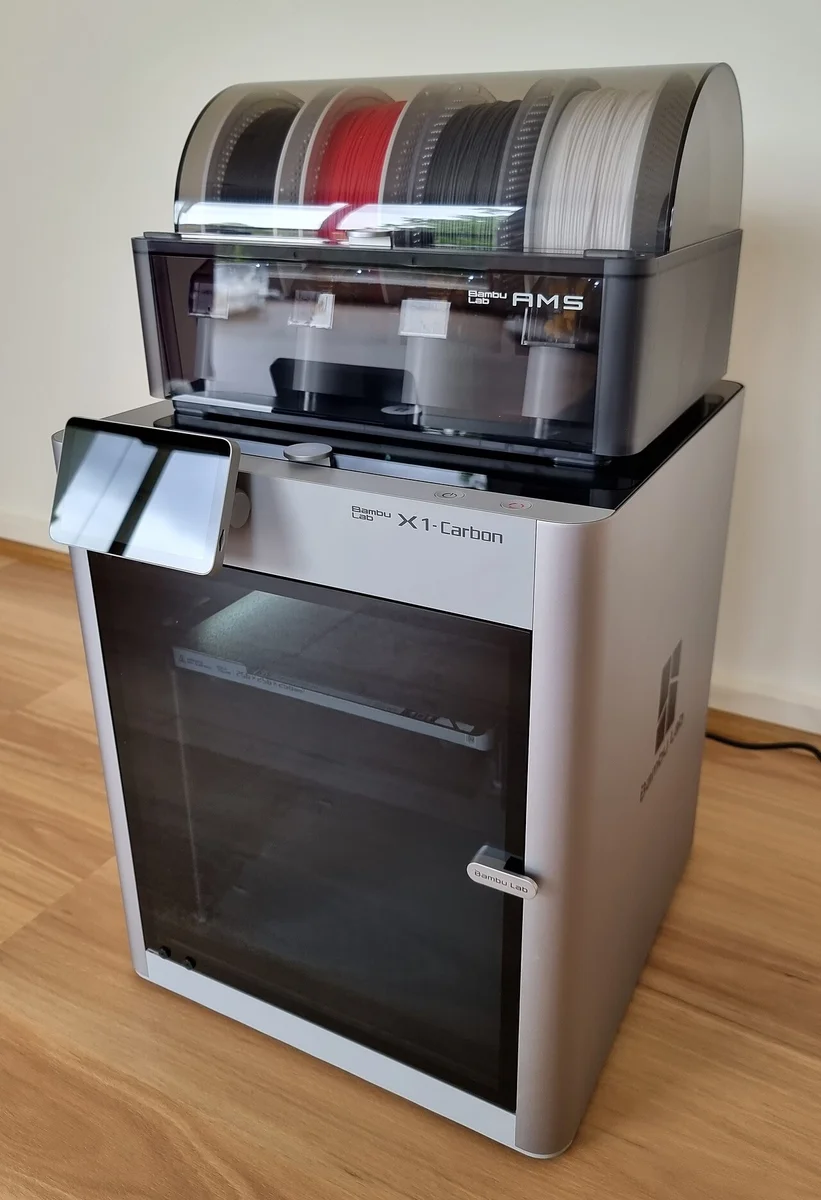
The machine that built the brand's reputation: enclosed 256 mm CoreXY, lidar for first-layer inspection and flow calibration, AI monitoring, hardened-steel 300 °C nozzle. It was pulled from the main consumer lineup in April 2026, but it remains extremely common and perfectly viable — a good used one at the right price is no bad choice.
X2D
The replacement (≈ $649 alone, ≈ $899 Combo) changes approach: a dual nozzle on a shared toolhead (mechanical switching), with a left direct-drive nozzle (fast, ideal for TPU and precision) and a right Bowden nozzle (mainly for support or a second color, slower). The payoff: clean support removal with a dedicated material, the heated chamber (≤ 65 °C) and lidar as standard — all cheaper than the X1C was at launch. → our detailed X2D review.
Anyone who wants flawless supports or a second material (TPU, soluble) without going large format. The X2D brings the main benefit of dual extrusion — separating model and support — into an affordable desktop size.
H series — H2D, H2S, H2C
The H series is large-format and production territory. Reinforced frames, heated chamber, very high speeds (up to ~1,000 mm/s peak on the H2S), and three different multi-material philosophies.
H2D — the creative Swiss Army knife
Released early 2025 (≈ $1,899 alone, ≈ $2,199 AMS Combo; laser versions cost more). Volume ~350 × 320 × 325 mm, 350 °C nozzle, and crucially a dual nozzle (two direct-drive nozzles on one toolhead, with auto nozzle-lift — not a classic IDEX) that enables dual-material and dual-color with no cross-purging. It accepts laser, engraving and drag-knife cutting modules — a real fabrication station. An H2D Pro variant (≈ $3,799) adds enterprise network security and a tungsten-carbide nozzle. → our detailed H2D review.
H2S — the newest, giant single nozzle
The most notable new release (≈ $1,249 alone, ≈ $1,499 AMS Combo, ≈ $2,099 laser version). Bambu pitches it as the "ultimate single-nozzle printer": ~340 × 320 × 340 mm volume (≈ 220% of the X1C), up to 30% faster than the X1C, a PMSM (synchronous-motor) extruder, 23 sensors and 3 cameras. By dropping dual extrusion, it targets print farms and education: lots of volume and throughput at a contained price. → our detailed H2S review.
H2C — low-waste multi-material
The most "color without waste" oriented (≈ $2,399). It replaces one extruder with a system of swappable hotends (up to 7 materials/colors), each material keeping its own path. The result: it avoids much of the purge of single-nozzle systems, at the cost of more complex mechanics.
H2S for maximum volume and throughput at the best price (single-material or classic AMS multicolor). H2D for dual-nozzle dual-material and/or laser/cutting. H2C if low-waste multi-material is your priority.
The AMS ecosystem
The AMS (Automatic Material System) is Bambu's equivalent of Creality's CFS: a multi-spool feeder that handles filament selection, switching and auto-relay. There are now several versions — a common source of confusion.
| Version | Spools | Drying | For |
|---|---|---|---|
| AMS Lite | 4 (open frame) | None | A1 & A1 mini |
| AMS (original) | 4 (enclosed, desiccant) | Passive | X / P / H series |
| AMS 2 Pro | 4 (enclosed, airtight) | Active ≤ 65 °C | Recent models |
| AMS HT | 1 (high-temp) | Active, high-temp | Technical filaments |
Key points:
- You can chain several AMS units (typically up to 4) for 16 colors.
- The AMS 2 Pro adds active drying (heated air vent at 65 °C) and airtight storage — your spools live in a dry box (see our humidity guide). Drying needs a communication link (6-pin cable) and, depending on the model, an external power supply.
- The AMS HT is a single-spool high-temperature drying unit, made for engineering filaments the AMS 2 Pro only partially dries.
- The AMS Lite (A series) is open and has no drying: perfect for PLA/PETG color, less so for hygroscopic materials.
- Like any single-nozzle system, TPU and flexibles feed poorly through the AMS: load them directly.
Multicolor: the real cost
The AMS, like Creality's CFS or an MMU, uses (with exceptions) a single nozzle. On each color change, the nozzle purges the old shade before the new one: all that purged plastic is waste. It's the fundamental trade-off of single-nozzle multicolor, not a Bambu-specific flaw (our multicolor guide covers the alternatives).
- Expect ~15–25% waste on simple parts, ~30–40% on a 4-color print with frequent changes.
- Bambu Studio lets you purge into infill or a sacrificial object, and tune purge volumes per color pair.
- The dual-nozzle (H2D) and multi-hotend (H2C) approaches strongly reduce this waste by giving each material its own path — that's their main appeal.
Single-nozzle multicolor is spectacular but slow and hungry. Day to day, the AMS's biggest benefit is often dry storage and auto-relay between spools, not the rainbow.
Strengths & weaknesses
What makes Bambu strong
- Reliability & onboarding: auto calibration, ready-made profiles, it prints "well" on the first try.
- Software: Bambu Studio and the Handy app are among the most polished out there (color handling, remote monitoring, time-lapse).
- Ecosystem: mature AMS, coherent accessories, a large community and model library (MakerWorld).
- Speed & quality: fast, clean CoreXY; sensors (lidar/AI) on the higher-end models.
What deserves thought
- Fairly closed ecosystem: the experience is optimized around Bambu's tools and cloud. The firmware authorization policy introduced in early 2025 drew debate over control and connectivity — check the offline/LAN modes if privacy matters to you.
- Multicolor waste: same as other single-nozzle systems (except dual-nozzle/multi-hotend).
- No TPU via AMS: flexibles load directly.
- Release cadence: the range moves fast (X1C and P1S already superseded); a "latest and greatest" model can be replaced quickly.
Which Bambu to pick?
Start with two questions: which materials and what part size?
- A1 mini — small budget, small space, PLA/PETG in color. The best entry ticket.
- A1 — getting serious with more volume, no chamber. Excellent value.
- A2L — the affordable open-frame large format for PLA/PETG, with vinyl cutting and pen plotting. For going big without a chamber.
- P1S — the cheapest versatile enclosed machine, for technical materials. P2S if you want the screen and AI.
- X2D — flawless supports and a second material (TPU/soluble) in a desktop size.
- H2S — big volume and throughput at the best price; H2D for dual nozzle + laser/cutting; H2C for low-waste multi-material.
What about used? A second-hand X1 Carbon or P1S is still a great buy: mature, reliable, fully supported machines. For multicolor, get the Combo upfront if you know you'll use it.
To start: A1 / A1 mini (or the A2L to go big). For a versatile workshop: P1S / P2S. For clean supports: X2D. For large format and production: the H series.